
Part of a series on building TrustDrafting, an AI estate-planning tool.
I’m an estate planning attorney building an application called TrustDrafting. It takes in a client interview and produces the standard package a plan needs — revocable living trust, pour-over will, powers of attorney, health-care directive, and the rest. For that to work, the system has to know how trusts are actually written, and not just one firm’s way of writing them. Early on, my entire clause library was built from two real trusts. Two. Every drafting decision the system made was quietly assuming those two documents were “the way trusts are written,” when they were really just the way two lawyers wrote them.
The fix is obvious to say and hard to do: read a lot more real trusts, drafted by a lot of different firms, across a lot of years. But polished trust documents are scarce and proprietary. Nobody publishes their forms.
The reservoir hiding in plain sight
Court files. When a trust gets litigated, the instrument itself is filed as an exhibit — the complete, executed document, signatures and notary blocks and schedules and all. A colleague handed me roughly 117 California court filings, about a gigabyte of complaints, petitions, and accountings, with real trusts buried inside them.
Buried is the right word. A 100-page filing might hold a trust on pages 12 through 58, a pour-over will on 60 through 67, two amendments somewhere after that, and pleadings everywhere else. Many were photocopies of photocopies, scanned as flat images with no readable text. Some were mislabeled. One was outright corrupt. Several hundred genuine estate-planning documents sat mixed into thousands of pages of litigation paperwork, and reading it all by hand was never going to happen.
So I built a pipeline to do it, ran it across the whole pile, and ended with 283 clean, verified documents from 86 families’ court files — trusts, restatements, amendments, wills, codicils, powers of attorney, health-care directives — for a few dollars in processing cost. That corpus now feeds everything else in my product.
This post is about the pipeline itself, because I’ve extracted it from my project into a standalone toolkit any attorney can run on their own pile of filings. The link is at the end.
How the toolkit works
The design principle, which I wrote about in the last post, is a deterministic shell around a probabilistic core. AI does the reading and the judgment calls — deciphering a 1987 photocopy, deciding where a trust ends and the next exhibit begins, recognizing that a filing holds two unrelated families. Plain code enforces the rules — every document has its three files, every carved PDF opens and matches its page span, and no source document is ever lost. The model judges; the code verifies.
Concretely, the work happens in stages:
A survey pass sweeps the raw pile once. For each filing it reads the text, names the matter from the trust’s own title — not the docket-style filename, which usually names the plaintiff — and files it into a per-family folder with an index row and a cheap “does this look like a trust?” score.
Per-folder deep processing is where the real work happens, and it’s done by AI agents rather than a script, because it requires judgment. Each agent reads one family’s folder against a written spec: audit the filing, find *every* estate-planning instrument and its exact page span, carve each one into its own PDF with a full-text transcription and a one-page overview, and write a manifest documenting what was found and what was deliberately left behind. The spec is the heart of the system — a plain-language operating manual with numbered acceptance criteria, hardened every time a run surfaced a new way to fail.
A mechanical verifier then checks every folder against those acceptance criteria — no AI involved, just code confirming completeness, integrity, and above all that no source filing was deleted. Only folders that pass get kept.
A catalog generator builds a single browsable page over the whole corpus, so “show me every trust with a QTIP marital structure” becomes a glance instead of an archaeology project.
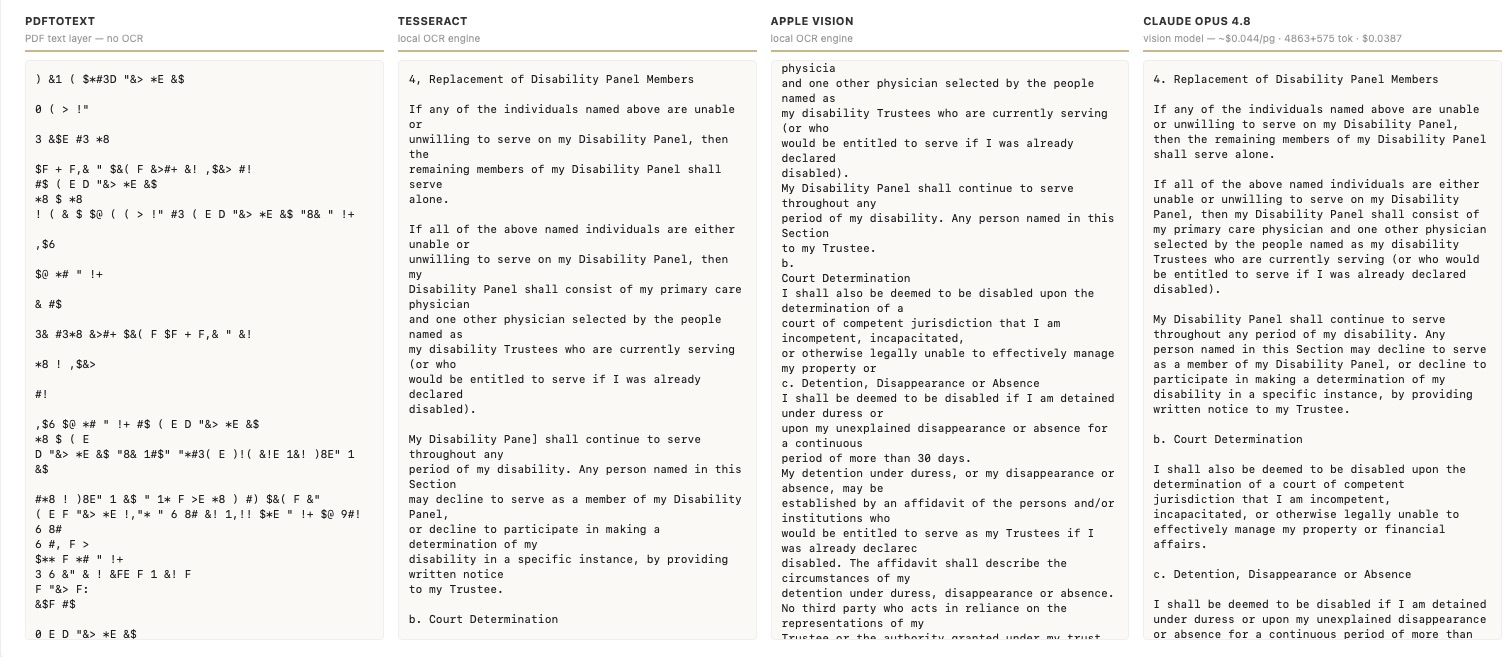
The OCR layer underneath deserves a word, because it’s where the economics live. Before committing to anything, I ran a bake-off on my hardest scans: plain text extraction, two free local OCR engines, and two AI vision models. The AI models were the only ones that kept every clause, got the legal terms right, and rebuilt mangled structure — and the small model matched the expensive one at a tenth of the cost, about half a cent per page. Just as important, the pipeline routes page by page: if a page already carries a clean digital text layer, that layer is used directly, free. Only genuinely scanned pages go to the vision model, and a free offline engine stands by as a fallback — which is why, when my API credits ran out mid-run, the pipeline degraded gracefully instead of dying. The whole corpus cost single-digit dollars to process.
What the pile taught me
The first pass lies, gently, in predictable ways. Every filing the survey flagged as “no trust here” actually contained one — they were image-only scans the text-based triage couldn’t see. One person appeared as two separate cases under two surnames. One folder held two unrelated families who happened to share a name. None of this is the model being stupid; it’s the model being confidently wrong exactly where a careful human would slow down. It’s why the verification layer isn’t optional.
Identify documents by content, never by filename. Some full court filings had been copied under trust-like names. An AI agent, trying to be tidy, deleted one — a 101-page source filing named like a trust. A tripwire in the verifier flagged the deletion before it became permanent, and the fix became a permanent line in the spec: never delete a source, even one named like a trust. No agent has repeated the mistake since.
Real legal documents trip AI safety filters. Notary stamps, court seals, elder-abuse allegations, tax schedules full of Social Security numbers — all of these occasionally caused the vision model to refuse a page. The pipeline treats a refusal like any other failure: fall back to whatever text exists, note the page, keep going. Several documents only completed because of that.
And the one I learned late: formatting is legal content. My first pass extracted everything to plain text, and it took actually working with the documents to see what that destroys. In a trust, typography carries meaning. Bold and italics mark defined terms. An underlined phrase may be doing legal work. Quotation marks scope exactly what a provision incorporates. A plain-text file silently flattens all of it, and once flattened, you can’t tell what was emphasized from what wasn’t. The toolkit now transcribes to Markdown, with the vision model reproducing the typography actually on the page — bold as bold, italics as italics, quotes exactly as printed. There’s a subtle catch: a clean digital text layer, the fast free path, carries no formatting at all. So for an instrument whose typography matters, the toolkit reads every page visually, at half a cent a page. Cheap insurance against destroying meaning you didn’t know was there.
If you want to run it on your own pile
A few honest notes. Court filings are public records, which is what makes AI-vision OCR appropriate here — the pages do get sent to an API. Don’t point this at client-confidential material without confirming your confidentiality and data-handling obligations first. The corpus keeps documents as filed; if you republish extracted language in a product or a form bank, redaction is your job at that point. And the per-folder processing assumes you’re working with an AI coding agent that can follow a written spec — the spec and the verifier are what make that safe, but “validate on two folders before you batch fifty” is a rule I’d keep.
The toolkit is here: [github.com/bryantjk/court-corpus-toolkit]. The README covers setup and usage, the processing spec ships as the operating manual it became, and the lessons above — plus the ones I didn’t have room for — are written up in the repo’s `docs/LESSONS.md`.
Two documents was a thin foundation for teaching a machine how lawyers draft. Two hundred and eighty-three is a start worth building on — and the courthouse has more.